How to do this at home (DIY)
Explanation
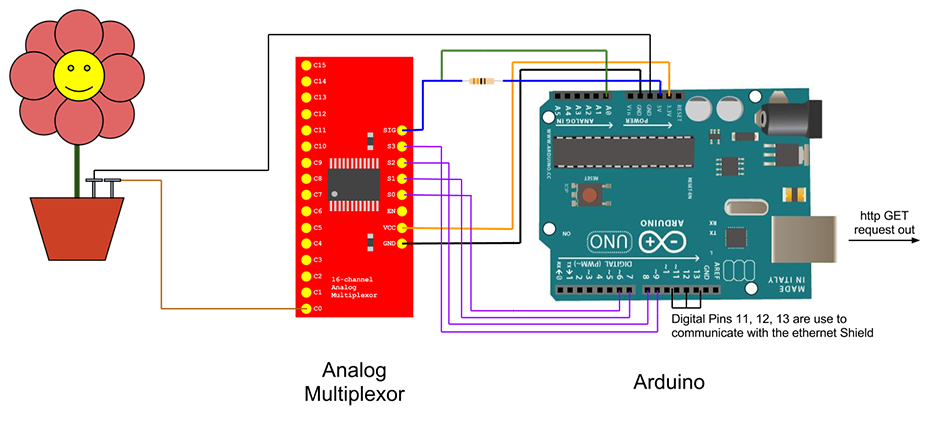
Above is a scematic of the design we followed to create our network of moisture sensors in the technology garden. The above diagram is expandable to measure up to 16 plants as is and can be modified to monitor others with the additon of more multiplexors.
Materials you will need:
Description
The sensors used are made using two galvanized nails that are inserted into the soil of the pot, the resistance between them gives you the moisture levels which are read using the analogue input on the arduino microcontroller. The Addition of the Multiplexor made it possible to monitor many more plants then we had pins on our controller.
References
To give credit where credit is due, the sites below proved as valuable resources in the creation of our project and should be visited for further investigation on this project.
http://bildr.org/2011/02/cd74hc4067-arduino/http://electroschematics.com/6519/simple-soil-moisture-sensor-arduino-project/
http://georgesattler.id.au/archives/136
The Code for the Arduino
const int VAL_PROBE = 0; // Analog pin 0 #include#include //Mux control pins int s0 = 6; int s1 = 7; int s2 = 8; int s3 = 9; //sensor value varibles int moist2 =0; int moist3 =0; int moist4 =0; int moist5 =0; byte server[] = {###,###,###,##}; //ip of server //mac adress byte mac[] = { 0x00, 0x00, 0x00, 0x00, 0x00, 0x00}; EthernetClient client; //Mux in "SIG" pin int SIG_pin = 0; void setup() { //setup for mutiplexor pinMode(s0, OUTPUT); pinMode(s1, OUTPUT); pinMode(s2, OUTPUT); pinMode(s3, OUTPUT); digitalWrite(s0, LOW); digitalWrite(s1, LOW); digitalWrite(s2, LOW); digitalWrite(s3, LOW); Serial.begin(9600); // start the Ethernet connection: if (Ethernet.begin(mac) == 0) { Serial.println("Failed to configure Ethernet using DHCP"); // no point in carrying on, so do nothing forevermore: for(;;) ; } // give the Ethernet shield a second to initialize: delay(1000); Serial.println("connecting..."); // if you get a connection, report back via serial: if (client.connect(server, 80)) { Serial.println("connected"); } } void loop() { //sensor1 multiplextor output 1 digitalWrite(s0, HIGH); digitalWrite(s1, LOW); digitalWrite(s2, LOW); digitalWrite(s3, LOW); delay(1000); Serial.println("sensor 2"); moist2 = analogRead(SIG_pin); Serial.println(moist2); delay(1000); //sensor2 multiplextor output 2 digitalWrite(s0, LOW); digitalWrite(s1, HIGH); digitalWrite(s2, LOW); digitalWrite(s3, LOW); delay(1000); Serial.println("sensor 3"); moist3 = analogRead(SIG_pin); Serial.println(moist3); delay(1000); //sensor3 multiplextor output 3 digitalWrite(s0, HIGH); digitalWrite(s1, HIGH); digitalWrite(s2, LOW); digitalWrite(s3, LOW); delay(1000); Serial.println("sensor 4"); moist4 = analogRead(SIG_pin); Serial.println(moist4); delay(1000); //sensor4 multiplextor output 4 digitalWrite(s0, HIGH); digitalWrite(s1, HIGH); digitalWrite(s2, LOW); digitalWrite(s3, LOW); delay(1000); Serial.println("sensor 5"); moist5 = analogRead(SIG_pin); Serial.println(moist5); delay(1000); if(client.connect( server , 80)){ Serial.println("connected..."); Serial.println("ARDUINO: forming HTTP request message"); client.print("GET /index.php?moist1="); client.print(moist2); client.print("&moist2="); client.print(moist3); client.print("&moist3="); client.print(moist4); client.print("&moist4="); client.print(moist5); client.println(" HTTP/1.1"); //client.println("Host: Host Address"); client.println("Host: Host Address"); client.println(); Serial.println("ARDUINO: HTTP message sent"); delay(3000); if(client.available()) { Serial.println("ARDUINO: HTTP message received"); Serial.println("ARDUINO: printing received headers and script response...\n"); while(client.available()) { char c = client.read(); Serial.print(c); } } else { Serial.println("ARDUINO: no response received / no response received in time"); } client.stop(); } delay(600000); }